✨ Coming soon: Meeting Mode hides personal tabs on screen share

Save your work. Switch in a second.

Cove captures every app, window, tab, and file open on your Mac, then restores it in one click. Switch projects like loading a save in a game, without the 10-minute reset.
One-time payment · Lifetime updates · macOS 15+
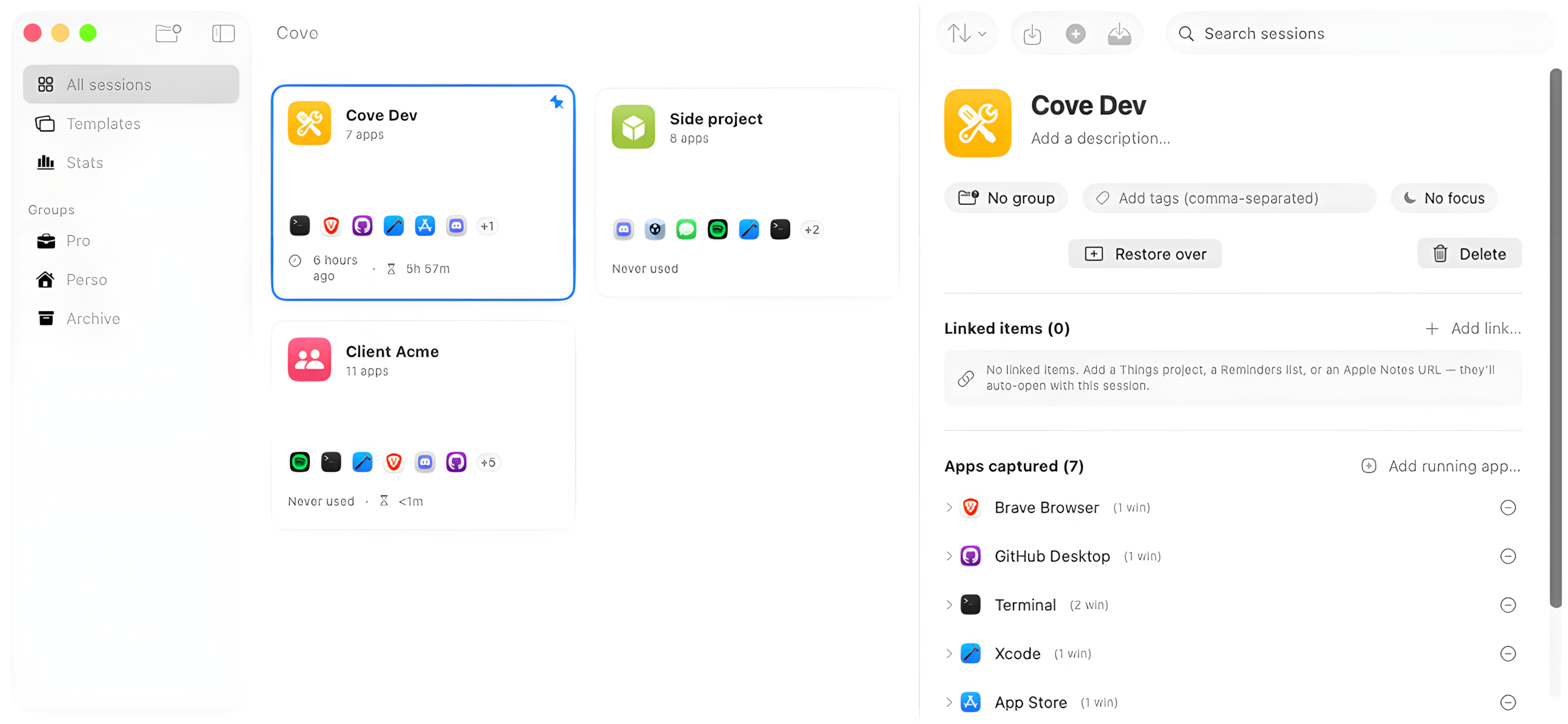
Cove for Mac: main window showing the session grid and detail panel

Works with the apps you already use

Safari Chrome Arc Brave Edge VS Code Xcode Terminal iTerm Finder Slack Discord
See it in action

Cove in 30 seconds.

Capture, park, restore. Your whole workspace, back in one click. Here's the quick tour.

Music from Uppbeat · License code: PRKHYHKP44FTZT4R

The problem

Every project switch costs you ~10 minutes.

Closing tabs, rearranging windows, hunting for files, fixing Focus Mode. Cove gives that time back: save your workspace once, restore it in a click.

How it works

Three actions, infinite reuse.

One primitive, a Session, captures your entire workspace. Once saved, switching is one click.
Capture session demo
1

Capture

Open what you need, then save it all as a named Session: apps, windows, tabs, files, Focus Mode, and linked Reminders or Notes.
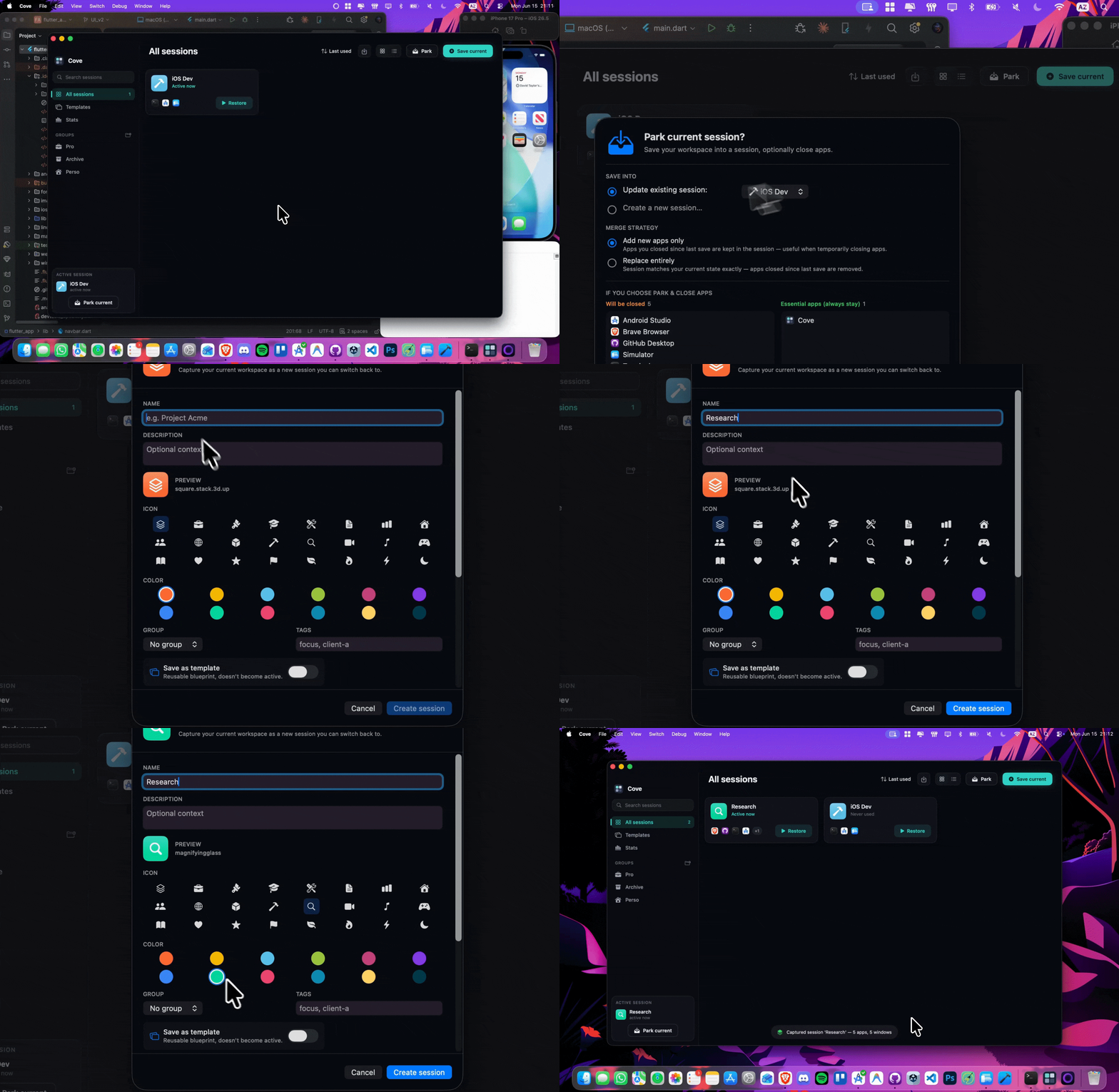
Park session demo
2

Park

Switching contexts? Cove "parks" the current session, capturing its exact state before closing the apps. Like git stash for your whole desktop. Nothing is lost.
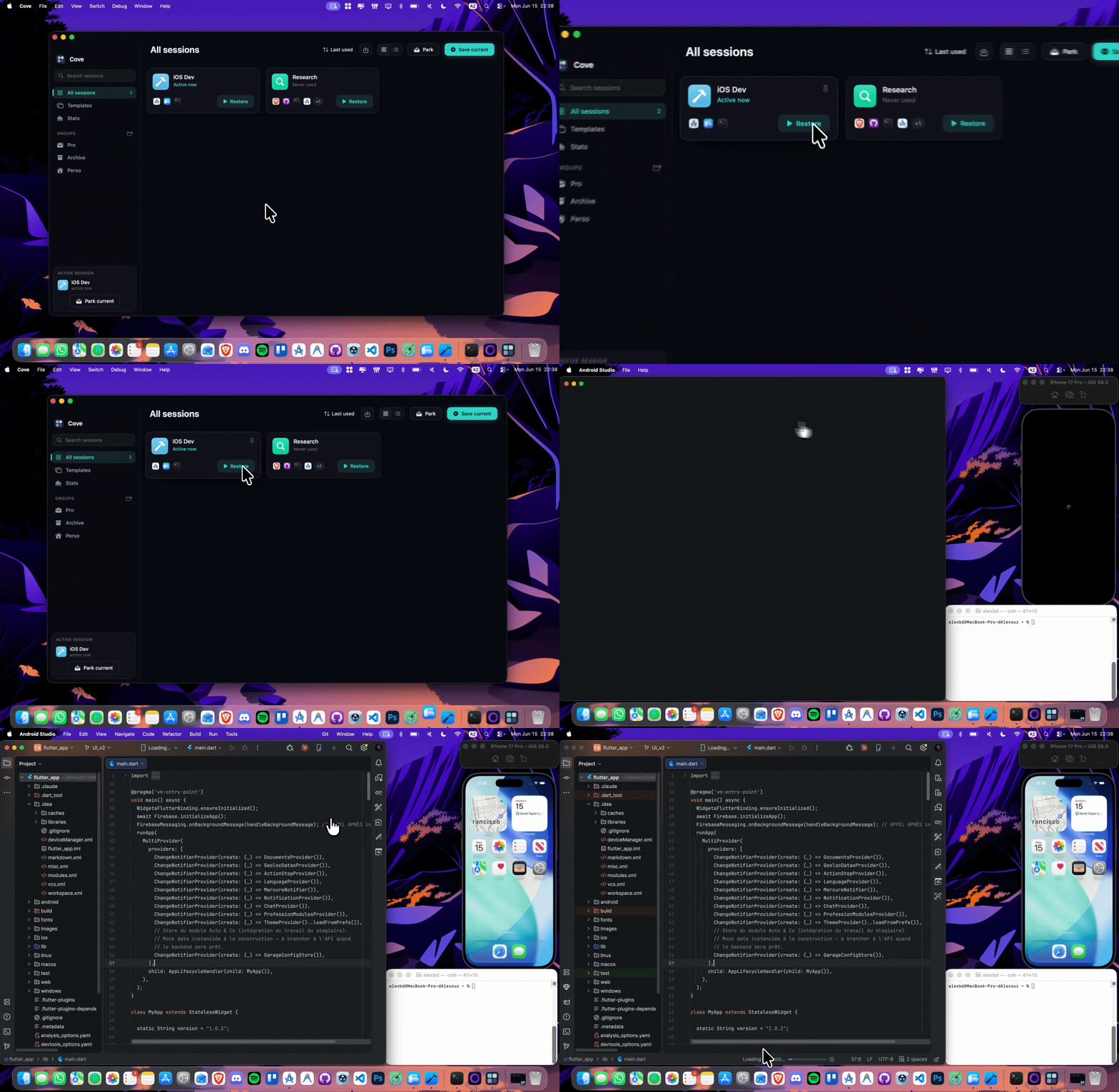
Restore session demo
3

Restore

Pick a session from the menu bar, hit ⌘1, or let auto-detect suggest it. In one second every app, window, tab, and file is back exactly where you left it.

Features

Everything you need. Nothing you don't.

Auto-detect

Cove watches the apps you open and suggests the matching session before you ask. Weighted scoring ignores ambient apps like Mail or Spotify.

Browser-aware

Native adapters for Safari, Chrome, Brave, Edge, and Arc capture tab order and active state, and reopen every URL exactly as you left it.

Terminal sessions

Terminal and iTerm preserve your working directory per window. Drop straight back into the right project folder.

Templates

Save a Session as a reusable template: the apps without their content. Perfect for recurring rituals.

Focus Mode

Each session can trigger a macOS Focus Mode via Shortcuts: restore "Deep Work" and Slack/Mail go silent automatically.

Linked items Meeting Mode coming soon

Attach Reminders, Notes, docs, or any URL to a session and they auto-open at restore so the context comes back complete. Meeting Mode is landing soon: it will hide your personal apps and browser tabs while you share your screen, then bring them back in one click.

Pricing

One-time. Lifetime.

No subscription. No data collection. Pay once, own it forever, get every update.

Lifetime License
$19.99

One-time payment. Yours forever, with all future updates included.

  • Save unlimited sessions
  • All adapters: Safari, Chrome, Arc, Terminal, VS Code, Xcode, Slack
  • Auto-detect, templates, linked items, Focus Mode
  • iCloud sync between your Macs · 2 activations
Buy Cove for Mac Download free trial

Free 14-day trial, no card needed · macOS 15+ · Powered by Lemon Squeezy · 14-day money-back guarantee
FAQ

Honest answers.

Cove runs on macOS 15 (Sequoia) and later, on both Apple Silicon and Intel Macs. It works best when you grant it Accessibility and Automation permissions; these are required so Cove can capture window positions and instruct apps like Safari/Chrome/Arc to reopen tabs at restore time. No other special hardware needed.
Cove uses AppleScript and Accessibility APIs to capture and restore the state of other apps (your browsers, your terminals, your Finder windows). Apple's App Store sandbox restricts these capabilities for security reasons. Going direct lets us deliver the full feature set, and means more of your purchase goes to development rather than Apple's 30% commission.
Cove uses Sparkle, the standard auto-update framework for direct-distributed Mac apps. It checks for updates daily in the background and notifies you when a new version is ready. Every update is signed with EdDSA and verified before install, the same mechanism used by Bartender, CleanShot, Hookmark, and most indie Mac apps. All updates are free for the lifetime of your purchase.
100% locally on your Mac, in Cove's app data folder. Sessions are stored in a SwiftData database, never sent to any server, never analyzed, never sold. We don't run any backend. Coming soon: optional iCloud sync between your Macs (encrypted, end-to-end via Apple's CloudKit). You can opt in or stay fully local.
Yes. Download Cove and start a free 14-day trial, no card required. You get the full app, with up to 3 saved sessions during the trial. Buy a license any time to unlock unlimited sessions and keep everything you've set up.
Try the free trial first to be sure Cove fits your workflow. If you buy and still change your mind, there's a 14-day refund, no questions asked. Email me directly with your order number and you get your money back. No forms, no friction.
Yes, that's the point. When you switch sessions, Cove "parks" your current state (saving everything) and closes apps that aren't part of the next session. This is what makes context switches actually clean. You can also configure "essential apps" (Mail, Slack, Spotify) that Cove never closes regardless of session.
Spaces show you windows on different desktops, but they don't save state: your apps are still running, your Mac is still bogged down, and switching just hides one mess to show another. Cove actually closes what you're not using, persists state to disk, and restores it later. It's a save/load system, not a window manager.
Each license includes 2 activations, so you can run Cove on a personal Mac and a work Mac at the same time. Need a third? Contact me, I usually grant additional activations for legitimate cases (replaced Mac, etc.). Once iCloud sync ships, your sessions will follow you between activated Macs automatically.
Yes. There's an Alfred workflow: type a keyword, then switch to a session, park the current one, or save your workspace, all without opening Cove. It needs Alfred's Powerpack.